Career Mode, Cups & Transfers Guide
Understand how seasons, league tables, cup tournaments, transfer offers, and international call-ups work in Be a Soccer Legend.
Tracking Your Season and League Table
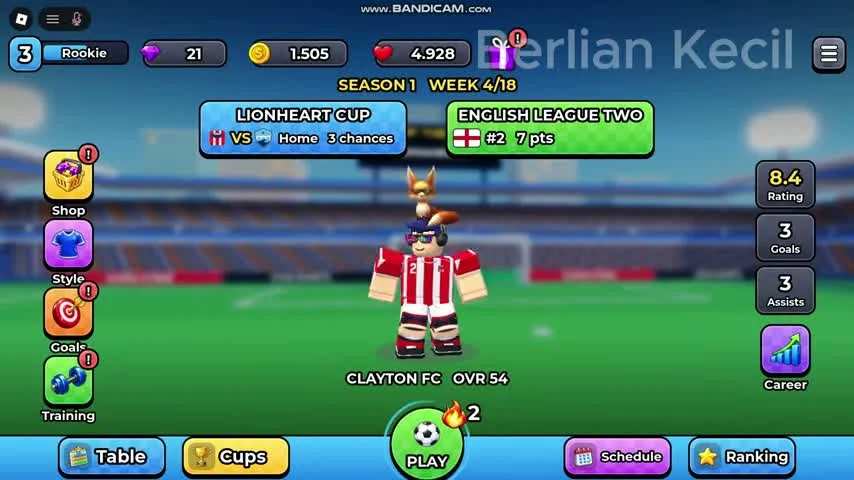
Your journey in Be a Soccer Legend begins at a modest club where your weekly fixtures build your reputation. On the main career dashboard, you can monitor your progress through the Season and Week counter, your club's league placement, and your individual player statistics.
For example, in a reviewed recording of Season 1, the player begins at Week 1/18 with Clayton FC at OVR 51. By Season 1, Week 4/18 in that same playthrough, the dashboard updates to show Clayton FC at OVR 54, sitting at Rank 2 with 7 points in English League Two, while the player holds an 8.4 match rating with 3 goals and 3 assists. Keep in mind that these specific club names, week counts, and ratings come from one recorded save file; your own career screen will reflect your current club, division, and performance.
- Read the league position and points shown directly on the main hub.
- Read the Season and Week display to track calendar progress.
- Check the visible rating, goals and assists panels between fixtures, then inspect the named navigation tabs for further details.
Playing Domestic and Continental Cups
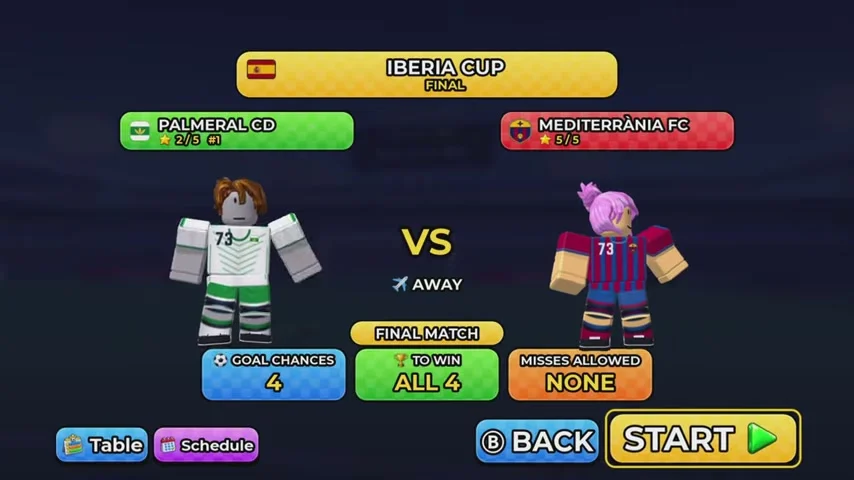
Alongside your weekly league campaign, the official game description highlights winning national cups and continental cups. On your career hub, the Cups tab tracks these tournaments, and cup fixtures appear directly in your weekly schedule, such as the Iberia Cup and Lionheart Cup seen in recorded gameplay.
Before pressing Start on any cup tie, always read the prematch requirement card. Cup matches can be unforgiving: a recorded Iberia Cup prematch screen required converting ALL 4 out of 4 goal chances with Misses allowed set to NONE. Because other fixtures may set different target numbers, checking the Goal chances, To win, and Misses allowed lines before every round ensures you are never caught off guard.
Transfer Offers and Moving to Bigger Clubs
One of the main long-term goals advertised in Be a Soccer Legend is getting transfer offers from the biggest clubs as you develop from a young talent into a world star. Raising your OVR through training and posting strong goals, assists, and match ratings are the core ways you improve your player profile over a season.
Instead of chasing unverified stat formulas, inspect your Career and main hub screens as you advance through your season weeks. Keep completing your Training OVR boxes and maintaining a high match rating so your player is ready whenever transfer opportunities appear on your dashboard.
National Team Call-Ups and the World Cup
Beyond club soccer, the official game description states that you can get called up for your country, compete for the World Cup, become top scorer, and win the Golden Ball, with future updates promising new leagues and new countries. Just like club transfers, the exact unlock conditions and timing for national team call-ups and World Cup qualification are not disclosed in the official description or visible on the Season 1 menus.
As you progress through seasons, watch your Schedule, Cups, and Career tabs for international fixtures and award milestones, and check the official Roblox game page when new updates roll out additional countries and leagues.